
Should You Install a Coupon Browser Extension?
The first time I watched a coupon extension work, I sat there grinning. I was checking out, a little pop-up said it was trying codes, and in twenty seconds it tested fourteen of them, found one worth 10%, and the total dropped. It felt like hiring a tiny assistant who works for tips. Three years later I still like the convenience — but I know exactly what it costs, and it is more than it looks.
Coupon extensions are free because you are not the customer. The store commissions and your browsing data are the product. Here is what one actually does at checkout, the commission trade nobody puts on the box, the privacy price, and the narrow set of cases where I think one is worth installing.
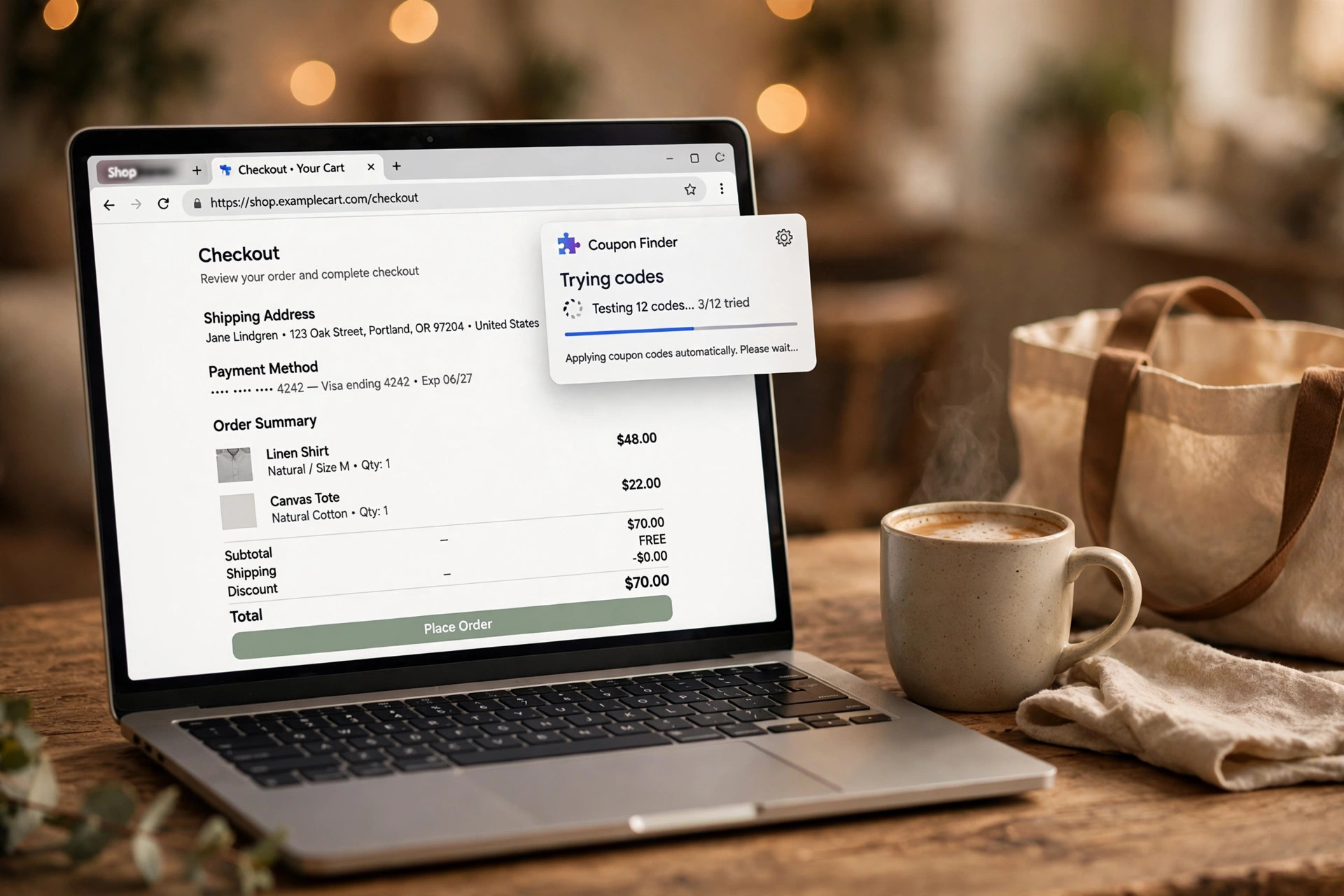
What it actually does at checkout
The extension watches for checkout pages — the promo-code box is its trigger. When it sees one, it offers to test codes: it pastes each code from its public list into the box, submits, reads the new total, and keeps the lowest. Twenty codes in a minute is normal.
That is the whole trick. It is not hacking anything; it is automating the thing you would do manually if you had the patience: copy-pasting codes from a coupon page. The better ones also flag cashback or points offers at that store, and some watch prices after you buy for drop refunds. I have watched mine save a real $18 on a hotel booking and a real $0 on the next forty checkouts. Both outcomes are the product working exactly as designed.
The commission trade nobody puts on the box
Here is the part the marketing skips, and it matters to me because I run a deals site. When you click a link on a deals site and buy something, the store pays that site a small commission — a few percent. That commission is how the site stays free and keeps hunting deals.
A coupon extension typically replaces that referral cookie at checkout with its own. The store still pays a commission, but now it goes to the extension company — for a checkout where the extension may have found nothing. The deals site that surfaced the deal gets zero.
I learned this when a reader told me my links “stopped working” with their extension on. They were not broken; the credit was just rerouted. My rule now: I disable the extension on any deals site I want to keep alive. A 10% code at checkout is not worth much to me if the site that found the product disappears.
The privacy price
To catch every checkout, the extension has to watch every page. The permission it asks for — “read and change all your data on all the websites you visit” — is the broadest permission a browser offers, and it means what it says: it can see your checkouts, your banking tab, everything you type.
The companies are not shy about the business model once you read the privacy policy: commissions from the cookie-swap above, plus aggregated browsing data. Some have been caught overreaching, and the policies change quietly.
I am not telling you to never install one. I am telling you the price is real: a company with a front-row seat to your browsing. My compromise is a separate browser profile for shopping with the extension in it and nowhere else — my main browser, with email and banking, never sees it.
The “savings” are mostly codes you could have pasted yourself
The extension’s code list is public codes: the same WELCOME10 and FREESHIP on every coupon page. It tests them fast, which is the entire value. It does not have secret codes. The best codes — the email-signup 15%, the app-exclusive code, the student discount, the one-time card-linked offer — are never in its list because they are tied to you, not to the public.
And the savings counter is theater. It credits the extension with the full discount of every code it applies, even the one you would have typed yourself in ten seconds, even the automatic free-shipping threshold. I have seen mine claim “$24 saved” on a cart where the “winning” code was the store’s own sitewide sale.
The expired-code loop is the tell: fourteen codes tested, eleven long dead, the spinner running for a minute on a $40 order. Your time has a price too.
When one is actually worth it
A store you have never bought from and probably will not again. No email signup, no trusted code source, one purchase, done. That is the extension’s best case: public codes on a one-off checkout where nobody is owed a referral and the store has no loyalty relationship with you.
Skip it where you have a stake: deals sites you like (the cookie swap), stores where you want the loyalty account to record the purchase cleanly, and any checkout that feels fragile — travel bookings, event tickets, anything where a spinner injecting codes into the page can break the flow. It happens.
And re-audit once a year. If the extension has slowed your browser, broken a checkout, or its privacy policy got worse, uninstall it. A tool that saves you $30 a year and watches everything you do is a bad trade; a tool that saves $30 a year on one-off checkouts inside a shopping-only profile is a fine one. That is where mine lives.
Frequently asked questions
Do coupon extensions really find the best code?
They test a list of public codes, not a secret database. The best codes are usually store-specific — email signup, app-only, student, card-linked — and never in their list. Expect the public-code floor, not magic.
Is it safe to let an extension read every page I visit?
It is the broadest browser permission there is: the extension can see everything you browse and type, including checkouts. That is how it works, so decide with eyes open — narrowest permissions and a separate profile keep the blast radius small.
Does using a coupon extension take money from deals sites?
Often, yes. Clicking a deals link earns the site a commission from the store; the extension usually replaces that referral at checkout. If you want a site to keep publishing deals, pause the extension there.